We actually used Typora before sitting down to write this. Not a quick install and a skim through the features, but weeks of real use, writing long documents, testing the export pipeline, pushing the theme system, and comparing it against the tools people most commonly switch to or switch from. The review below is the result of that.
Typora has been around for a while now, but in 2026 it remains one of the most discussed markdown editors in the productivity space. The reason is simple: it solved a problem that no one else had properly solved at the time, and the solution still holds up. Whether a $14.99 one-time purchase is the right call for you in 2026 depends on a few things, and we will cover all of them here.
Typora 2026 Quick Summary
|
Product |
Typora |
|
Type |
Desktop Markdown editor (WYSIWYG) |
|
Platforms |
Windows, macOS, Linux |
|
Current Version |
1.13.7 (as of June 2026) |
|
Pricing Model |
One-time license, no subscription |
|
License Price |
$14.99 (covers up to 3 devices) |
|
Free Trial |
15 days, no credit card required |
|
Mobile App |
None (desktop only) |
|
Export Formats |
PDF, Word (.docx), HTML, ePub, LaTeX, and more |
|
Markdown Standard |
GitHub Flavored Markdown (GFM) plus extensions |
|
Open Source |
No (proprietary, closed source) |
|
Icon Polls Rating |
4.0 out of 5 |
Icon Polls Ratings Breakdown
We scored Typora across twelve categories based on real use. Here is how it breaks down.
|
Category |
Score (out of 5) |
Notes |
|
Markdown Editing Experience |
5.0 / 5 |
Best live WYSIWYG rendering available in any editor today |
|
Window and Interface Design |
4.5 / 5 |
Clean, minimal, distraction-free. Themes add real flexibility |
|
Download and Setup |
4.5 / 5 |
Simple install on all three platforms, up and running in minutes |
|
Pricing and Value |
5.0 / 5 |
$14.99 one-time for 3 devices is one of the best deals in productivity software |
|
Export Options |
4.5 / 5 |
PDF, Word, HTML, ePub, LaTeX all covered. Pandoc-powered output is clean |
|
Alternatives Comparison |
3.5 / 5 |
Best pure editor, but no sync, no mobile, and no plugin ecosystem |
|
File and Folder Management |
3.5 / 5 |
File tree works fine but lacks tags, notebooks, or organisational depth |
|
Customisation and Themes |
4.0 / 5 |
CSS-based theme system is powerful if you know how to use it |
|
LaTeX and Diagram Support |
4.5 / 5 |
MathJax v4 and Mermaid 11.13 in v1.13 are genuine improvements |
|
Long-Term Development |
3.5 / 5 |
Active but indie. Updates are slower than major-funded competitors |
|
Overall User Experience |
4.0 / 5 |
Excellent for focused writing. Gaps show at the edges of the workflow |
|
OVERALL ICON POLLS RATING |
4.0 / 5 |
A near-perfect editor for what it sets out to do |
What Is Typora and Who Made It?
Typora is a desktop markdown editor built by Abner Lee. It is a closed-source, proprietary product that has been in development since around 2014, operating as a free beta for years before going paid in November 2021 at the current price of $14.99 for a lifetime license covering three devices.
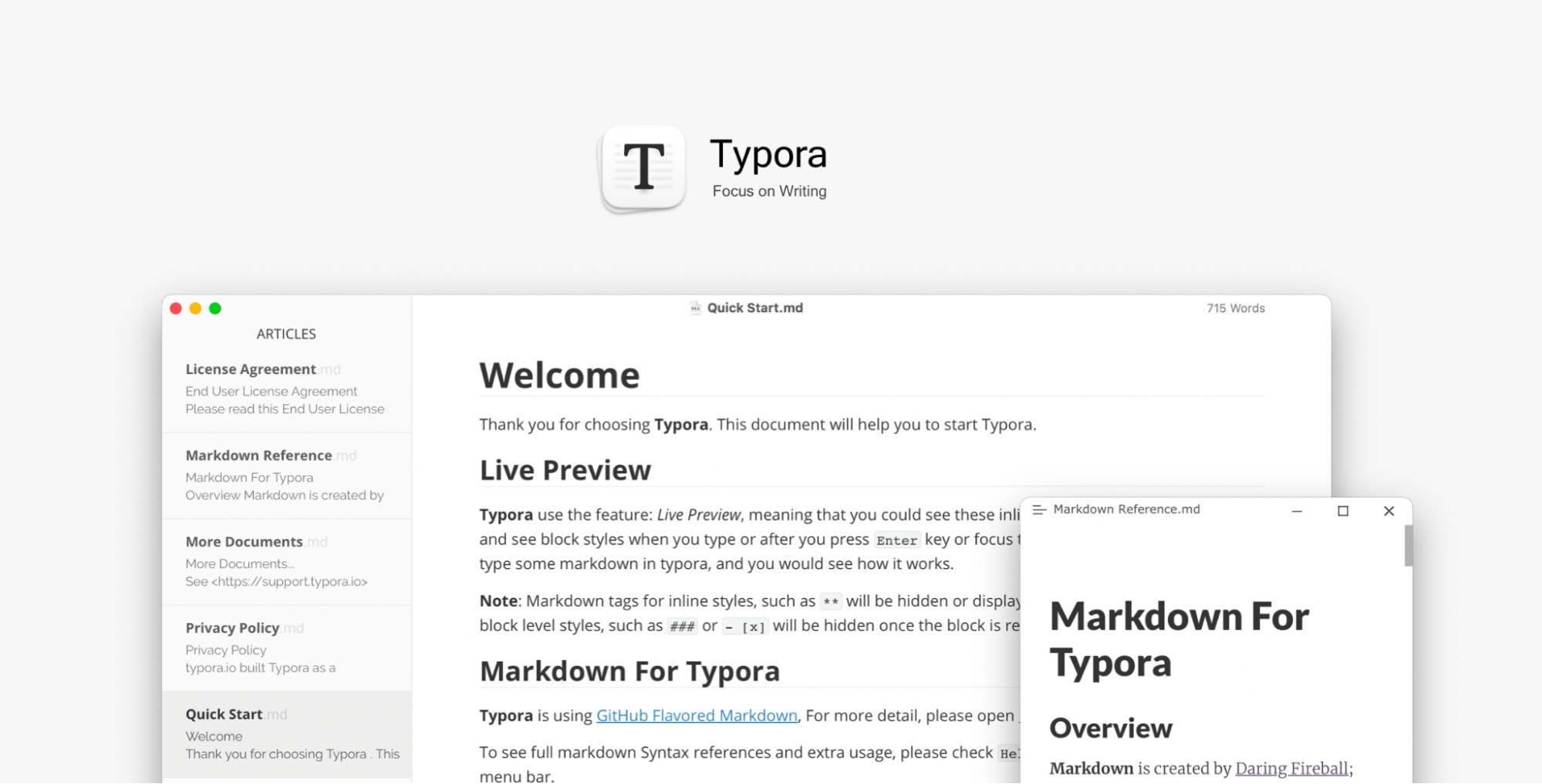
The central idea behind Typora is genuinely original in the markdown editor space. Almost every other markdown editor shows you raw syntax on one side of the screen and a formatted preview on the other. Typora throws that model out entirely. When you type a markdown symbol, it immediately becomes the thing it represents. Type ## and hit space, and it becomes a heading instantly. Type **bold**, and it becomes bold text with the asterisks vanishing. Click on the formatted text and the underlying syntax briefly reappears for editing. It feels like a word processor that quietly stores everything as clean plain text.
This approach has earned it a loyal following among writers, developers, and researchers who want the portability and simplicity of markdown without the constant mental translation that comes from looking at raw syntax.
Typora Markdown: What It Supports and How It Feels
Typora supports GitHub Flavored Markdown as its base, which means all the standard stuff works as you would expect: headings, bold, italic, strikethrough, ordered and unordered lists, blockquotes, horizontal rules, links, images, and inline code. Tables are fully editable visually, not just rendered from raw syntax.
Beyond the basics, Typora adds a few things that matter for technical users. LaTeX math equations are supported inline and as block-level elements using MathJax, which was updated to version 4 in the April 2026 version 1.13 release. If you write anything that involves mathematical notation, from academic papers to engineering documentation, this is a significant advantage over most alternatives. Mermaid diagrams are also supported, and the current release runs Mermaid 11.13, which adds sequence diagram improvements and several new diagram types.
Code blocks get full syntax highlighting, and the language is auto-detected if you leave the fence unlabelled. The outline panel automatically populates from your heading structure, which becomes genuinely useful when you are working in a document long enough to need navigation. Internal links to headers work, so you can create a table of contents manually or let Typora generate one for you.
What you do not get is any kind of wiki-style linking between documents, no backlinking, no tags, no knowledge graph. Typora is a document editor, not a note system. If you need the second-brain type of organisation, it is simply not the right tool. But for writing a document, a piece of documentation, a thesis chapter, or a technical guide, it is hard to find an editor that handles the actual writing part better.
Typora Window and Interface Design
The interface is the product. Typora's entire visual design is built around getting out of the way so that you can write. When you start typing, the toolbar disappears. The sidebar can be hidden. The status bar sits quietly at the bottom. What you are left with is your text and nothing else, rendered cleanly in whatever theme you have chosen.
The theme system is one of the more underrated parts of Typora. Out of the box it ships with five themes: Default, Github, Night, Newsprint, and Pixyll. Each changes not just colours but typography, spacing, and overall feel. For users comfortable with CSS, the theme system is entirely open. You write a CSS file, drop it in the themes folder, and Typora picks it up. The community has produced dozens of third-party themes, from minimal academic styles to dark-mode developer setups.
The window itself supports a full-screen writing mode and a focus mode that dims everything outside the current paragraph or sentence. Typewriter mode scrolls the page so that the line you are typing sits at the vertical centre of the screen. These are the kinds of features that sound optional until you start using them for extended writing sessions.
The 2026 updates added a quality-of-life improvement that had been frustrating users for years: settings changes no longer require a restart. Previously, switching things like themes or key preferences meant closing and reopening the app, which was a small but irritating interruption. That is now fixed in version 1.13.
One honest note on the window experience: Typora is a single-document editor. You work on one file at a time in the main window. There is no split-pane, no tabs for multiple documents, no side-by-side comparison. If your workflow involves working across multiple files simultaneously, this will feel limiting. The file tree sidebar helps, but it does not replace multi-document workspace views that tools like VS Code or Obsidian offer.
How to Download Typora in 2026
Downloading Typora is simple. Go to typora.io and grab the installer for your platform. Windows gets a standard .exe installer, macOS gets a .dmg, and Linux users can install via a .deb or .rpm package. Snap and Flatpak builds exist but are unofficial and not maintained by the Typora team, so if you are on Linux, the .deb or .rpm route is the recommended one.
The current stable version as of June 2026 is 1.13.7, which is part of the 1.13 line released in April 2026. The install is fast and lightweight. Typora does not require an account to download or use, which is a small but genuine point of difference from tools like Raycast or Notion that require you to sign up before you can even look at the interface.
A 15-day free trial is available from the moment you install. No credit card is required. At the end of the trial, you will be prompted to purchase a license for $14.99. The license covers three devices, so one purchase covers your work computer, home machine, and a laptop if you have all three. Beyond three devices, you need to purchase additional licenses.
There is no mobile app. Typora is desktop-only, and the team has not announced any plans to change that as of mid-2026.
Typora Pricing in 2026: Is It Worth It?
The pricing model is one of the most frequently discussed things about Typora, and it is easy to see why. When the app was in beta it was completely free, and a subset of longtime users still feels the sting of that transition. But looking at the actual number in 2026, $14.99 for a lifetime license covering three devices with no subscription is genuinely difficult to argue against.
To put that in context: Ulysses, a popular alternative for Mac and iOS writers, charges $5.99 per month or $49.99 per year. iA Writer costs $49.99 per platform, meaning if you use both Mac and Windows you are paying close to $100. Obsidian is free for personal use but charges $50 per year for commercial use and $10 per month for the Sync add-on if you want cross-device sync. Against all of those, Typora at $14.99 one-time is a genuinely good deal.
The catch, and it is a real one, is that you need to bring your own sync solution. Typora works with local files, which means if you want your notes available across machines, you need to handle that yourself using iCloud, Dropbox, Google Drive, or a Git-based workflow. For users who are comfortable with that, it is no big deal. For users who want sync built into the price, Typora is not the answer.
There are no hidden costs, no feature tiers, no upsells. You pay $14.99 and you get everything.
Typora Alternatives Worth Knowing About in 2026
Typora is the best pure markdown editor available, but best pure editor does not mean best tool for every person. Here is where the main alternatives fit differently.
Obsidian is the go-to choice for anyone building a knowledge base rather than editing individual documents. It handles backlinks, tags, graph views, and a huge plugin ecosystem. The WYSIWYG experience is not as smooth as Typora, but the organisational depth is in a different league. Free for personal use.
iA Writer is the premium alternative for writers who prioritise the craft of writing itself. It has a focus mode, a style checker, and publishing integrations that Typora does not touch. It costs significantly more per platform and does not have Typora's technical markdown depth for things like LaTeX or Mermaid diagrams.
Mark Text is the closest free alternative in terms of approach. It also uses real-time WYSIWYG markdown rendering. The honest assessment in 2026 is that development has slowed considerably and the project feels less maintained than it was a few years ago. For occasional use it is fine, but for daily work, Typora is noticeably more polished and actively updated.
VS Code with a markdown preview extension is worth mentioning for developers who already live in that environment. It does not match Typora's writing experience, but if you are switching between code and documentation constantly in the same tool, it avoids the context switch entirely.
Typora User Experience: What Using It Every Day Feels Like
The first time you type a heading in Typora and watch the hash symbols dissolve into a formatted heading, there is a small moment of genuine satisfaction. That sounds like an overstatement but it really is not. After years of working in split-pane editors where you write on one side and squint at a preview on the other, Typora feels like someone finally fixed something that did not need to exist as a problem.
That experience holds up over time. We used it across long technical documents, short blog posts, structured notes, and documentation with heavy code blocks, and the rendering consistency is excellent. The app does not slow down on long documents the way some editors do, and the outline panel means navigation in a 10,000-word document is genuinely manageable.
Where the experience starts to show its limits is around the edges of a writing workflow. There is no way to open multiple documents in tabs. There is no collaboration feature of any kind, no comments, no track changes, nothing. You cannot share a Typora document with someone else for live review without exporting it first. For solo writers working on personal machines this is not a problem at all. For anyone working in a team environment, it starts to matter.
The export experience is one of the highlights. PDF export uses the active CSS theme, so what you see in the editor is roughly what the PDF looks like. Word export is powered by Pandoc, which means the output is clean and structurally sound for documents with standard formatting. HTML export is equally solid. For anyone who spends time fiddling with export quality in other tools, Typora's output will feel like a relief.
Version 1.13, released in April 2026, brought some genuinely welcome updates. MathJax v4 improves rendering performance for heavy equation documents. Mermaid 11.13 adds new diagram types. The VS Code and Cursor launcher extension means developers can open files directly in Typora from their code editor, which closes a workflow gap that had been a friction point for that audience. Settings no longer requiring a restart is a small thing that removes a small daily irritation. The development pace is steady for an indie product, though it is clearly slower than well-funded competitors.
Our Verdict
After real use and testing, our rating is 4.0 out of 5.
The half point Typora loses from a clean five comes from the same place most of its limitations live: it is a dedicated editor, not a writing platform. No sync, no mobile, no collaboration, no organisation system, no plugin ecosystem. These are real gaps for real users. But they are also precisely what keeps Typora doing what it does so well. It has never tried to be everything, and as a result it is genuinely the best at the specific thing it focuses on.
For individual writers, developers, students, and researchers who work primarily on one machine or manage their own file sync, $14.99 for Typora is one of the easiest recommendations in productivity software. The one-time pricing, the quality of the markdown experience, the export options, and the steady ongoing development make a compelling case.
For teams who need collaboration, or users who want sync built in, or anyone who needs mobile access to their writing, Typora will leave gaps. Know those gaps before you buy, and if they matter to you, look at the alternatives section above.
As a pure writing tool for markdown, it remains the best available in 2026.
Frequently Asked Questions About Typora in 2026
1. Is Typora free?
Typora is not permanently free. It offers a 15-day free trial with no credit card required. After the trial, a one-time license costs $14.99 and covers up to three devices. There is no subscription.
2. What platforms does Typora run on?
Typora runs on Windows, macOS, and Linux. All three platforms are covered by a single $14.99 license. There is no mobile app for iOS or Android as of mid-2026.
3. How do I download Typora?
Download directly from typora.io. Windows gets a .exe installer, Mac gets a .dmg, and Linux users can install via a .deb or .rpm package. The current stable version is 1.13.7 as of June 2026.
4. Does Typora have a free plan?
No. There is a 15-day free trial but no permanent free tier. The one-time purchase of $14.99 is the only paid option, and it comes with no recurring fees.
5. What are the best alternatives to Typora in 2026?
The main alternatives are Obsidian for knowledge management and backlinks, iA Writer for premium focused writing on Mac, Mark Text for a free open-source WYSIWYG option, and VS Code with markdown extensions for developers who do not want to leave their code editor.
6. Does Typora support LaTeX?
Yes. Typora supports inline and block LaTeX math rendering via MathJax. Version 1.13 updated this to MathJax v4, which improves rendering performance. It is one of Typora's strongest features for academic and technical writers.
7. Can Typora export to Word or PDF?
Yes. Typora exports to PDF, Word (.docx), HTML, ePub, LaTeX, and several other formats. PDF export uses the active theme, and Word export is powered by Pandoc. Both produce clean output for standard document formatting.
8. Does Typora sync across devices?
Typora does not include built-in sync. It works with local files, so you need to manage sync yourself using iCloud, Dropbox, Google Drive, or a Git-based workflow. This is the most common limitation users mention when comparing it to tools like iA Writer or Notion.
Typora does not try to be everything. It tries to be the best markdown editor available for people who write on a desktop, and in 2026 it succeeds. The live rendering is still unmatched. The pricing is still one of the best deals in productivity software. The updates in version 1.13 show that the project is alive and improving.
If your writing life happens on a desktop and you work in markdown, there is a very good chance Typora is the right tool for you. Fifteen days free, no card required. You will know by the end of day two whether it clicks.