
Most VPNs want you to press one button and never think about them again. Windscribe is different. It gives you the button, then a drawer full of protocols, ports, firewall rules, blocklists and split tunnelling options. That makes it one of the more interesting privacy tools around in 2026. It also makes it the wrong pick for some people.
Icon Polls rates Windscribe 4.2 out of 5. That score reflects strong value, a free plan you can actually use, and a pricing model nobody else seems to copy. It stops short of top marks because the depth can overwhelm beginners and speed depends heavily on where you connect from.
The Scores in One Place
| Area | Score |
|---|---|
| App design and controls | 4.3/5 |
| Free plan value | 4.5/5 |
| Browser extension | 4.2/5 |
| Privacy features | 4.4/5 |
| Sign up and login | 4.1/5 |
| Download and device support | 4.3/5 |
| Speed and reliability | 3.9/5 |
| Overall | 4.2/5 |
What You Are Actually Getting
At its core, Windscribe encrypts your connection and routes it through a server of your choice. That hides your usual IP address from websites, makes casual tracking harder and adds a layer of protection on public Wi-Fi. On top of that sits a set of blocking tools for ads, trackers, malicious domains and whole categories of sites you choose to shut out.
It runs almost everywhere: Windows, macOS, Linux, Android, iPhone, televisions and routers, plus browser extensions for Chrome, Firefox, Edge, Opera and compatible Chromium or Firefox-based browsers. Free and Pro accounts both allow unlimited connections on your own personal devices, which is generous. The account is meant for you, though, not a household of strangers.
Signing Up Without an Email
Here is the detail that tells you what kind of company this is. You can create a Windscribe account with just a username and password. No email, no payment card.
That account gets 2 GB of data a month. Add and confirm an email address and the allowance rises to 10 GB. For most people, that trade is worth making, not only for the extra data but because an email is your only recovery route. Lose the password on an email-free account and you may simply lose the account.
Logging in works the same way on the website and in the apps. Once inside, you can see your plan, remaining data and upgrade options. Most login trouble comes down to a mistyped username or password rather than anything on Windscribe's side.
The App: One Button, Then a Rabbit Hole
The main screen is simple. Pick a location, tap the power button, done. The settings are where things get serious: protocol choice between WireGuard, IKEv2, OpenVPN, Stealth and WSTunnel, custom ports, DNS preferences, network rules and a firewall that blocks traffic if the VPN connection drops.
Split tunnelling, available on Windows, macOS, Linux and Android, lets you decide which apps or sites go through the tunnel and which don't. Handy when your banking app objects to VPNs but you still want everything else covered.
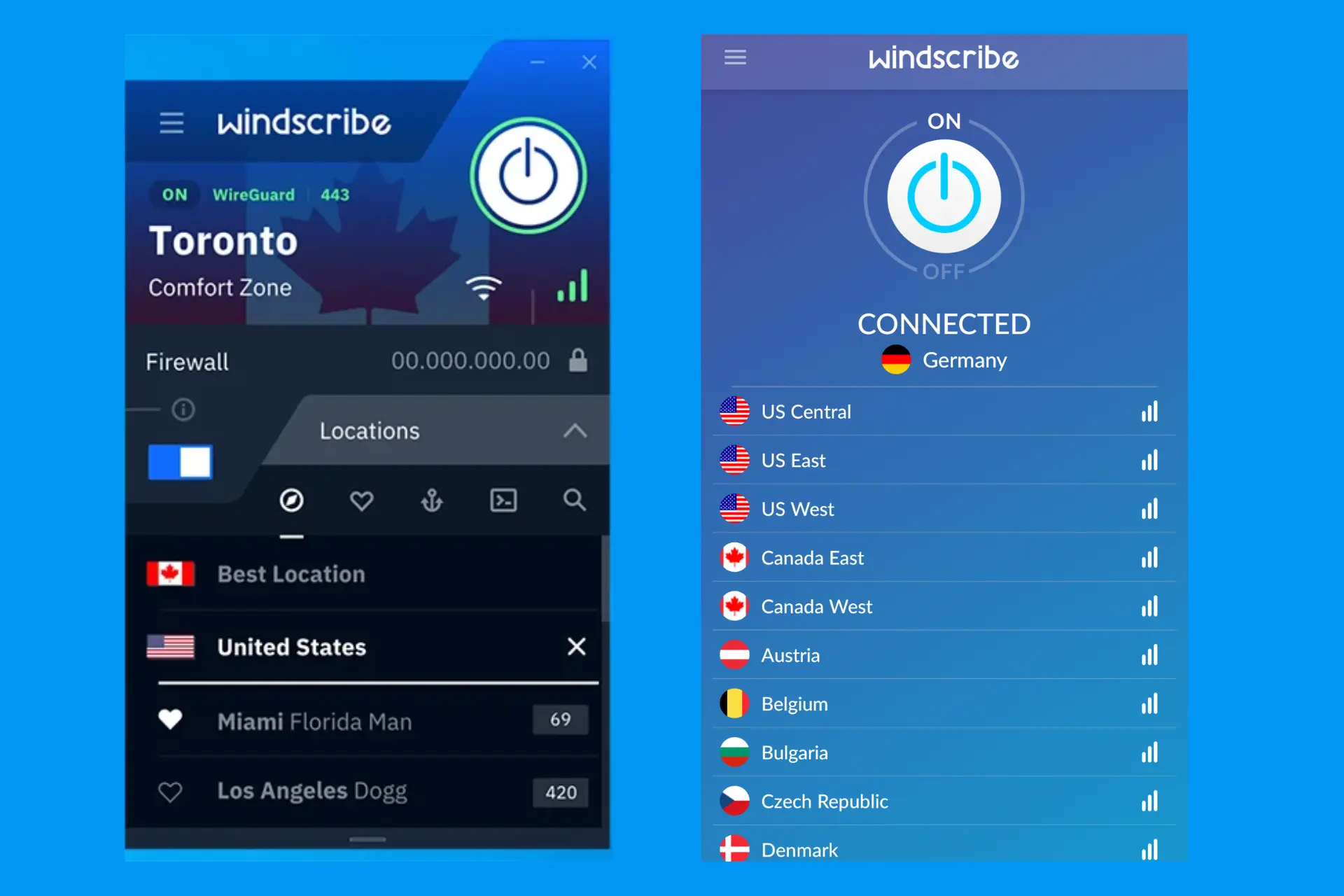
Our advice is boring but sound. Leave the automatic connection mode alone at first. Change one setting at a time, and only when something isn't working.
Then there's R.O.B.E.R.T., Windscribe's DNS-level blocker in the desktop and mobile apps. It filters ads, trackers, malware domains and chosen categories. Pro users get more categories and custom rules. Push it too hard and a legitimate page may refuse to load, which usually means allowing a domain or easing the blocklist.
The Extension Is Not the VPN
This is the misunderstanding we'd most like to clear up. The browser extension changes your browser's apparent IP address and blocks ads, trackers, cookies and social widgets with its own browser-level tools. It does nothing for traffic outside the browser.
Games, messaging apps, background updates and downloads through other programs all bypass it. For whole-device protection you need the desktop app, and Windscribe itself recommends running both. Safari users are out of luck: there's no official extension for it.
Download It From the Right Place
Get Windscribe from its official site, the Apple App Store, Google Play or another platform the company lists. Windows users need a supported 64-bit version of Windows 10 or newer for the current recommended app.
Avoid random APK sites and anything promising a cracked Pro account. A VPN sees your network traffic by design. A tampered one is about the worst software you could install.
Phones and computers take minutes to set up. Routers and manual WireGuard, OpenVPN or IKEv2 configurations take more patience and some networking knowledge.
How Far Does 10 GB Go?
Further than most free VPNs, not as far as you'd hope. The free tier uses the same core apps and encryption as paid accounts, just with fewer server countries and limited R.O.B.E.R.T. controls. It isn't a disguised trial that bills you later.
Ten gigabytes comfortably covers café Wi-Fi, messaging, light browsing and short sessions. Stream video, pull down game updates or leave the VPN on all day and it vanishes quickly.
Paying: Build-A-Plan Is the Clever Bit
Windscribe's most original idea is letting you buy only what you need. With Build-A-Plan, each location costs $1 a month, unlimited data with full R.O.B.E.R.T. access adds another $1, and the minimum purchase is $3 a month.
| Plan | Listed price | Suits |
|---|---|---|
| Free | $0 | Light use on 2 GB or 10 GB a month |
| Build-A-Plan | $3 minimum a month | Unlimited data in a handful of chosen locations |
| Pro Monthly | $9 a month | Short-term full access |
| Pro Yearly | $69 a year | Regular users wanting the lower annual cost |
| ScribeForce | From $5 per account monthly | Teams of five accounts or more |
Pro unlocks unlimited bandwidth and servers in more than 69 countries and 120 cities. Static IPs cost extra. Prices shift with currency, tax, payment method, promotions and app stores, so check the final billing page before you commit.
Where It Trips People Up
- Speed is variable. Nearby servers are generally quick, but distance, server load, protocol and your own connection all matter. The many protocol options help, if you know which to try.
- Free data runs out. Fine for light use, not for streaming.
- Some sites block VPNs. Split tunnelling is often the fix.
- The menus are dense. First-time VPN users may feel lost.
So, Who Is It For?
Windscribe suits people who like to tinker, care about privacy and don't want to pay for countries they'll never use. If you want a VPN that makes every decision for you, a simpler product will feel calmer.
The sensible path: start free, confirm your email for the 10 GB allowance, install the official app and try servers close to you. Need unlimited data in only one or two countries? Price up Build-A-Plan before paying for full Pro. And if security software is your thing, have your say in our vote on the best antivirus software.

Three Things People Ask
Does Windscribe keep logs?
Windscribe states it doesn't keep identifying connection logs that tie your IP address to browsing activity. Read the current privacy policy before relying on any VPN.
Is Windscribe good for streaming?
It can work, especially on paid locations, but nothing is guaranteed. Streaming services change their VPN rules without warning.
Can I use one account on several devices?
Yes. Free and Pro both allow unlimited connections on your own personal devices. Sharing it as a public or commercial service isn't allowed.